Running llama3 on the GPU of a RK1 Turing Pi
When I left my job in IT Operations, my colleagues were very generous and allowed me to fund the purchase of a Rockchip 3588 SBC Arm board (https://docs.turingpi.com/docs/turing-pi2-intro) for my experiments. Many thanks to them, you know who you are.
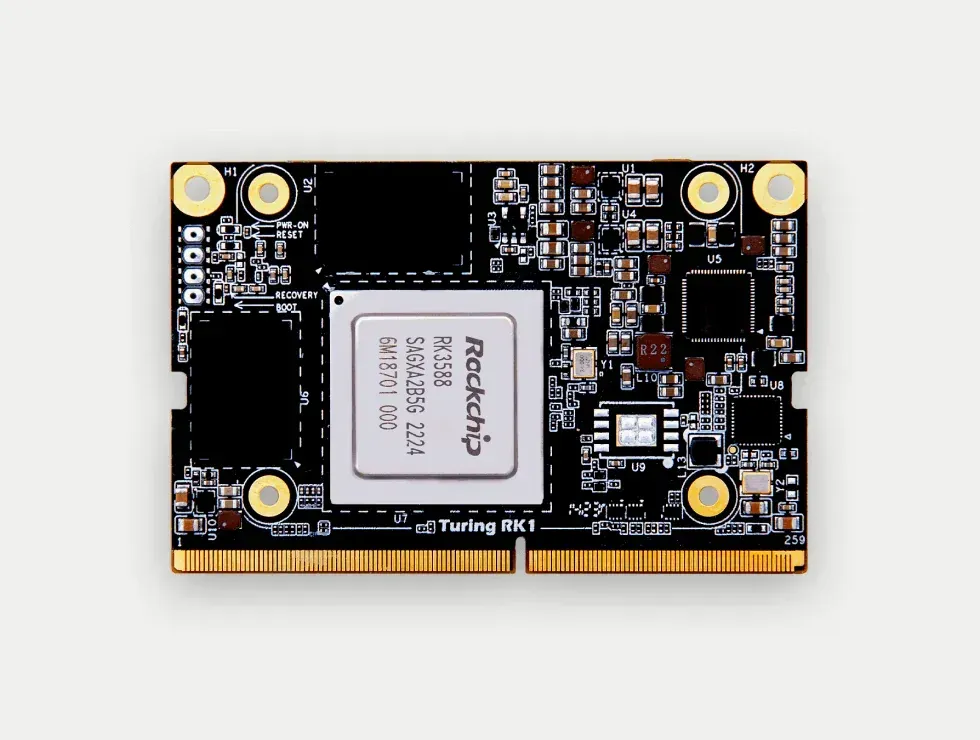
As this was a kickstarter, it took a while for the beast to reach me. Add to that the time it took to make it fully operational, which meant not only building a decent system image, but also delving into the specifications of the machine (which gave me a chance to brush up on memory addressing concepts I’d forgotten for at least twenty years) and building a fully functional compilation chain. But that’s another story, back to the main topic of this first article.
When Llama3 was released, which wasn’t that long ago, I saw quite a few people getting worked up on the support forums for these famous RK1 cards and wondering whether it was even possible to run this new model (some others a bit older) on their precious ones. The answer is yes, I did it, but there are still some rough edges. Here is a recipe for reaching this goal, which should also work for most of the mali-enabled Arm boards as long as you have enough memory on it. 8GB of system memory seems to be a minimum for running inference on a 4 bits quantized model (see below for more info). This is also possible because the system memory is equally accessible by the GPU and the CPU. The weights themselves are weighting a whooping 75GB so grab yourself a nice SD Card!
However, a word of warning here, keep in mind that quantization may require more memory than the 8 GB required at inference time. In the instruction presented below, the weights quantization operation is using nearly 20 GB of memory. I don’t know if such process can be performed with less memory. Two options may be used for getting through this issue :
Use a good amount of swap, which could help finishing the process at the expense of a much longer quantization time;
Perform quantization on another machine with a sufficient amount of memory. Indeed, weights seem to be portable across machine architectures. Theoretically, it should be feasible to run the quantization step on another machine and then transfer the result of this operation on the target machine. This should save you from having to build a cross compilation toolchain. I haven’t tested this though.
Now, the interesting part is that you can run some conversation with Llama 3 using mlc-llm for offloading the inference on the mali G610 GPU. Using this technique, it should be theoretically possible to run Llama3 on an 8GB Orange PI 5 which has the same processor. It needs a bit of tinkering though but it should work.
Here are the steps.
Installation of the OpenCL drivers
Install the mali-g610-firmware package for getting in place the firmware blobs containing the openCL stubs. For this, follow the excellent instructions given here https://clehaxze.tw/gemlog/2023/06-17-setting-up-opencl-on-rk3588-using-libmali.gmi by Martin Chang. After completing the installation, add yourself in the render group to gain access to the DRI devices:
Then check everything is detected correctly:
$ sudo clinfo Number of platforms 3 Platform Name ARM Platform Platform Vendor ARM Platform Version OpenCL 2.1 v1.g6p0-01eac0.2819f9d4dbe0b5a2f89c835d8484f9cd Platform Profile FULL_PROFILE Platform Extensions cl_khr_global_int32_base_atomics cl_khr_global_int32_extended_atomics cl_khr_local_int32_base_atomics cl_khr_local_int32_extended_atomics cl_khr_byte_addressable_store cl_khr_3d_image_writes cl_khr_int64_base_atomics cl_khr_int64_extended_atomics cl_khr_fp16 cl_khr_icd cl_khr_egl_image cl_khr_image2d_from_buffer cl_khr_depth_images cl_khr_subgroups cl_khr_subgroup_extended_types cl_khr_subgroup_non_uniform_vote cl_khr_subgroup_ballot cl_khr_il_program cl_khr_priority_hints cl_khr_create_command_queue cl_khr_spirv_no_integer_wrap_decoration cl_khr_extended_versioning cl_khr_device_uuid cl_arm_core_id cl_arm_printf cl_arm_non_uniform_work_group_size cl_arm_import_memory cl_arm_import_memory_dma_buf cl_arm_import_memory_host cl_arm_integer_dot_product_int8 cl_arm_integer_dot_product_accumulate_int8 cl_arm_integer_dot_product_accumulate_saturate_int8 cl_arm_scheduling_controls cl_arm_controlled_kernel_termination cl_ext_cxx_for_opencl Platform Extensions function suffix ARM Platform Host timer resolution 1ns Platform Name Clover Platform Vendor Mesa Platform Version OpenCL 1.1 Mesa 22.3.6 Platform Profile FULL_PROFILE Platform Extensions cl_khr_icd Platform Extensions function suffix MESA Platform Name rusticl Platform Vendor Mesa/X.org Platform Version OpenCL 3.0 Platform Profile FULL_PROFILE Platform Extensions cl_khr_icd Platform Extensions with Version cl_khr_icd 0x400000 (1.0.0) Platform Numeric Version 0xc00000 (3.0.0) Platform Extensions function suffix MESA Platform Host timer resolution 0ns Platform Name ARM Platform Number of devices 1 arm_release_ver of this libmali is 'g6p0-01eac0', rk_so_ver is '7'. Device Name Mali-LODX r0p0 Device Vendor ARM Device Vendor ID 0xa8670000 Device Version OpenCL 2.1 v1.g6p0-01eac0.2819f9d4dbe0b5a2f89c835d8484f9cd Device UUID 000067a8-0100-0000-0000-000000000000 Driver UUID 1e0cb80a-4d25-a21f-2c18-f7de010f1315 Valid Device LUID No Device LUID 0000-000000000000 Device Node Mask 0 Device Numeric Version 0x801000 (2.1.0) Driver Version 2.1 Device OpenCL C Version OpenCL C 2.0 v1.g6p0-01eac0.2819f9d4dbe0b5a2f89c835d8484f9cd Device OpenCL C Numeric Version 0x800000 (2.0.0) Device C++ for OpenCL Numeric Version 0x400000 (1.0.0) Device Type GPU Device Profile FULL_PROFILE Device Available Yes Compiler Available Yes Linker Available Yes Max compute units 4 Available core IDs (ARM) 0, 2, 16, 18 Max clock frequency 1000MHz Device Partition (core) Max number of sub-devices 0 Supported partition types None Supported affinity domains (n/a) Max work item dimensions 3 Max work item sizes 1024x1024x1024 Max work group size 1024 Preferred work group size multiple (kernel) 16 Max sub-groups per work group 64 Preferred / native vector sizes char 16 / 4 short 8 / 2 int 4 / 1 long 2 / 1 half 8 / 2 (cl_khr_fp16) float 4 / 1 double 0 / 0 (n/a) Half-precision Floating-point support (cl_khr_fp16) Denormals Yes Infinity and NANs Yes Round to nearest Yes Round to zero Yes Round to infinity Yes IEEE754-2008 fused multiply-add Yes Support is emulated in software No Single-precision Floating-point support (core) Denormals Yes Infinity and NANs Yes Round to nearest Yes Round to zero Yes Round to infinity Yes IEEE754-2008 fused multiply-add Yes Support is emulated in software No Correctly-rounded divide and sqrt operations No Double-precision Floating-point support (n/a) Address bits 64, Little-Endian Global memory size 33327280128 (31.04GiB) Error Correction support No Max memory allocation 33327280128 (31.04GiB) Unified memory for Host and Device Yes Shared Virtual Memory (SVM) capabilities (core) Coarse-grained buffer sharing Yes Fine-grained buffer sharing No Fine-grained system sharing No Atomics No Minimum alignment for any data type 128 bytes Alignment of base address 1024 bits (128 bytes) Preferred alignment for atomics SVM 0 bytes Global 0 bytes Local 0 bytes Max size for global variable 65536 (64KiB) Preferred total size of global vars 0 Global Memory cache type Read/Write Global Memory cache size 1048576 (1024KiB) Global Memory cache line size 64 bytes Image support Yes Max number of samplers per kernel 16 Max size for 1D images from buffer 65536 pixels Max 1D or 2D image array size 2048 images Base address alignment for 2D image buffers 32 bytes Pitch alignment for 2D image buffers 64 pixels Max 2D image size 65536x65536 pixels Max 3D image size 65536x65536x65536 pixels Max number of read image args 128 Max number of write image args 64 Max number of read/write image args 64 Max number of pipe args 16 Max active pipe reservations 1 Max pipe packet size 1024 Local memory type Global Local memory size 32768 (32KiB) Max number of constant args 128 Max constant buffer size 33327280128 (31.04GiB) Max size of kernel argument 1024 Queue properties (on host) Out-of-order execution Yes Profiling Yes Queue properties (on device) Out-of-order execution Yes Profiling Yes Preferred size 2097152 (2MiB) Max size 16777216 (16MiB) Max queues on device 1 Max events on device 1024 Controlled termination caps. (ARM) Controlled Success, Controlled Failurure Prefer user sync for interop No Profiling timer resolution 1000ns Execution capabilities Run OpenCL kernels Yes Run native kernels No Sub-group independent forward progress Yes Scheduling controls (ARM) Kernel batching, Work-group batch size, Work-group batch size modifier, Register allocation Supported reg allocs (ARM) 32, 64 Max warps/CU (ARM) <printDeviceInfo:211: get CL_DEVICE_MAX_WARP_COUNT_ARM : error -30> IL version SPIR-V_1.0 ILs with version SPIR-V 0x400000 (1.0.0) printf() buffer size 1048576 (1024KiB) Built-in kernels (n/a) Built-in kernels with version (n/a) Device Extensions cl_khr_global_int32_base_atomics cl_khr_global_int32_extended_atomics cl_khr_local_int32_base_atomics cl_khr_local_int32_extended_atomics cl_khr_byte_addressable_store cl_khr_3d_image_writes cl_khr_int64_base_atomics cl_khr_int64_extended_atomics cl_khr_fp16 cl_khr_icd cl_khr_egl_image cl_khr_image2d_from_buffer cl_khr_depth_images cl_khr_subgroups cl_khr_subgroup_extended_types cl_khr_subgroup_non_uniform_vote cl_khr_subgroup_ballot cl_khr_il_program cl_khr_priority_hints cl_khr_create_command_queue cl_khr_spirv_no_integer_wrap_decoration cl_khr_extended_versioning cl_khr_device_uuid cl_arm_core_id cl_arm_printf cl_arm_non_uniform_work_group_size cl_arm_import_memory cl_arm_import_memory_dma_buf cl_arm_import_memory_host cl_arm_integer_dot_product_int8 cl_arm_integer_dot_product_accumulate_int8 cl_arm_integer_dot_product_accumulate_saturate_int8 cl_arm_scheduling_controls cl_arm_controlled_kernel_termination cl_ext_cxx_for_opencl Device Extensions with Version cl_khr_global_int32_base_atomics 0x400000 (1.0.0) cl_khr_global_int32_extended_atomics 0x400000 (1.0.0) cl_khr_local_int32_base_atomics 0x400000 (1.0.0) cl_khr_local_int32_extended_atomics 0x400000 (1.0.0) cl_khr_byte_addressable_store 0x400000 (1.0.0) cl_khr_3d_image_writes 0x400000 (1.0.0) cl_khr_int64_base_atomics 0x400000 (1.0.0) cl_khr_int64_extended_atomics 0x400000 (1.0.0) cl_khr_fp16 0x400000 (1.0.0) cl_khr_icd 0x400000 (1.0.0) cl_khr_egl_image 0x400000 (1.0.0) cl_khr_image2d_from_buffer 0x400000 (1.0.0) cl_khr_depth_images 0x400000 (1.0.0) cl_khr_subgroups 0x400000 (1.0.0) cl_khr_subgroup_extended_types 0x400000 (1.0.0) cl_khr_subgroup_non_uniform_vote 0x400000 (1.0.0) cl_khr_subgroup_ballot 0x400000 (1.0.0) cl_khr_il_program 0x400000 (1.0.0) cl_khr_priority_hints 0x400000 (1.0.0) cl_khr_create_command_queue 0x400000 (1.0.0) cl_khr_spirv_no_integer_wrap_decoration 0x400000 (1.0.0) cl_khr_extended_versioning 0x400000 (1.0.0) cl_khr_device_uuid 0x400000 (1.0.0) cl_arm_core_id 0x400000 (1.0.0) cl_arm_printf 0x400000 (1.0.0) cl_arm_non_uniform_work_group_size 0x400000 (1.0.0) cl_arm_import_memory 0x400000 (1.0.0) cl_arm_import_memory_dma_buf 0x400000 (1.0.0) cl_arm_import_memory_host 0x400000 (1.0.0) cl_arm_integer_dot_product_int8 0x400000 (1.0.0) cl_arm_integer_dot_product_accumulate_int8 0x400000 (1.0.0) cl_arm_integer_dot_product_accumulate_saturate_int8 0x400000 (1.0.0) cl_arm_scheduling_controls 0x3000 (0.3.0) cl_arm_controlled_kernel_termination 0x400000 (1.0.0) cl_ext_cxx_for_opencl 0x400000 (1.0.0) Platform Name Clover Number of devices 0 Platform Name rusticl Number of devices 0 NULL platform behavior clGetPlatformInfo(NULL, CL_PLATFORM_NAME, ...) ARM Platform clGetDeviceIDs(NULL, CL_DEVICE_TYPE_ALL, ...) Success [ARM] clCreateContext(NULL, ...) [default] Success [ARM] clCreateContext(NULL, ...) [other] <error: no devices in non-default plaforms> clCreateContextFromType(NULL, CL_DEVICE_TYPE_DEFAULT) Success (1) Platform Name ARM Platform Device Name Mali-LODX r0p0 clCreateContextFromType(NULL, CL_DEVICE_TYPE_CPU) No devices found in platform clCreateContextFromType(NULL, CL_DEVICE_TYPE_GPU) Success (1) Platform Name ARM Platform Device Name Mali-LODX r0p0 clCreateContextFromType(NULL, CL_DEVICE_TYPE_ACCELERATOR) No devices found in platform clCreateContextFromType(NULL, CL_DEVICE_TYPE_CUSTOM) No devices found in platform clCreateContextFromType(NULL, CL_DEVICE_TYPE_ALL) Success (1) Platform Name ARM Platform Device Name Mali-LODX r0p0 ICD loader properties ICD loader Name OpenCL ICD Loader ICD loader Vendor OCL Icd free software ICD loader Version 2.3.1 ICD loader Profile OpenCL 3.0
Installation of TVM and MLC-LLM
Now that the system part is working properly, install the Unity TVM compiler following the instructions on this page https://llm.mlc.ai/docs/install/tvm.html#install-tvm-unity. Choose build from source. I did not use Conda as presented but chose to setup a virtual environment. Make sure you enable OpenCL by adding the directive set(USE_OPENCL ON) in your config.cmake file.
Compilation of TVM can take a while, mine took roughly 30 minutes to compile. After compilation, the installable library is found in the python sub-directory. With the virtualenv activated, a simple "pip install ." should do the job.
Install the https://llm.mlc.ai/docs/install/mlc_llm.html again, building from source and answering yes when asked if you want to build MLC-LLM with OpenCL support. The installation procedure is the same as for TVM.
Download the Llama 3 model
Download the model for example from HuggingFace. You need both the instruct version https://huggingface.co/meta-llama/Meta-Llama-3-8B-Instruct/ and the file tokenizer.json from the full version of the Llama3 model https://huggingface.co/meta-llama/Meta-Llama-3-8B.
You should now have the ingredients of the recipe, let’s start cooking!
Convert the weights
Convert the weights (it should take around 3 minutes for doing so) by issuing:
mlc_llm convert_weight --quantization q4f16_1 --device opencl --output Meta-Llama-3-8B-Instruct_MLC Meta-Llama-3-8B-Instruct/config.json
You shoud get the following output (this was truncated as the weight conversion is somewhat boring):
$ time mlc_llm convert_weight --quantization q4f16_1 --device opencl --output Meta-Llama-3-8B-Instruct_MLC Meta-Llama-3-8B-Instruct/config.json
[2024-04-21 13:56:31] INFO auto_device.py:76: Found device: opencl:0
[2024-04-21 13:56:31] INFO auto_config.py:115: Found model configuration: Meta-Llama-3-8B-Instruct/config.json
[2024-04-21 13:56:31] INFO auto_weight.py:70: Finding weights in: Meta-Llama-3-8B-Instruct
[2024-04-21 13:56:31] INFO auto_weight.py:136: Not found Huggingface PyTorch
[2024-04-21 13:56:31] INFO auto_weight.py:143: Found source weight format: huggingface-safetensor. Source configuration: Meta-Llama-3-8B-Instruct/model.safetensors.index.json
[2024-04-21 13:56:31] INFO auto_weight.py:106: Using source weight configuration: Meta-Llama-3-8B-Instruct/model.safetensors.index.json. Use `--source` to override.
[2024-04-21 13:56:31] INFO auto_weight.py:110: Using source weight format: huggingface-safetensor. Use `--source-format` to override.
[2024-04-21 13:56:31] INFO auto_config.py:153: Found model type: llama. Use `--model-type` to override.
Weight conversion with arguments:
  --config          Meta-Llama-3-8B-Instruct/config.json
  --quantization    GroupQuantize(name='q4f16_1', kind='group-quant', group_size=32, quantize_dtype='int4', storage_dtype='uint32', model_dtype='float16', linear_weight_layout='NK', quantize_embedding=True, quantize_final_fc=True, num_elem_per_storage=8, num_storage_per_group=4, max_int_value=7)
  --model-type      llama
  --device          opencl:0
  --source          Meta-Llama-3-8B-Instruct/model.safetensors.index.json
  --source-format   huggingface-safetensor
  --output          Meta-Llama-3-8B-Instruct_MLC
[2024-04-21 13:56:31] INFO llama_model.py:52: context_window_size not found in config.json. Falling back to max_position_embeddings (8192)
[2024-04-21 13:56:31] INFO llama_model.py:72: prefill_chunk_size defaults to context_window_size (8192)
Start storing to cache Meta-Llama-3-8B-Instruct_MLC
arm_release_ver of this libmali is 'g6p0-01eac0', rk_so_ver is '7'.
[2024-04-21 13:56:38] INFO huggingface_loader.py:182: Loading HF parameters from: Meta-Llama-3-8B-Instruct/model-00004-of-00004.safetensors
[2024-04-21 13:56:45] INFO group_quantization.py:232: Compiling quantize function for key: ((128256, 4096), float16, opencl, axis=1, output_transpose=False)
[2024-04-21 13:56:47] INFO huggingface_loader.py:164: [Quantized] Parameter: "lm_head.q_weight", shape: (128256, 512), dtype: uint32
[2024-04-21 13:56:48] INFO huggingface_loader.py:164: [Quantized] Parameter: "lm_head.q_scale", shape: (128256, 128), dtype: float16
[2024-04-21 13:56:48] INFO huggingface_loader.py:172: [Not quantized] Parameter: "model.layers.31.input_layernorm.weight", shape: (4096,), dtype: float16
[2024-04-21 13:56:49] INFO group_quantization.py:232: Compiling quantize function for key: ((4096, 14336), float16, opencl, axis=1, output_transpose=False)
[2024-04-21 13:56:50] INFO huggingface_loader.py:164: [Quantized] Parameter: "model.layers.31.mlp.down_proj.q_weight", shape: (4096, 1792), dtype: uint32
[...]
[2024-04-21 13:58:55] INFO huggingface_loader.py:194: Unloading HF weight file: Meta-Llama-3-8B-Instruct/model-00002-of-00004.safetensors
[2024-04-21 13:58:57] INFO huggingface_loader.py:194: Unloading HF weight file: Meta-Llama-3-8B-Instruct/model-00003-of-00004.safetensors
[2024-04-21 13:58:58] INFO stats.py:76: Time usage: HF loading: 19.166 sec; Pre-quantization mapping: 62.397 sec; Quantization: 17.402 sec
[2024-04-21 13:58:58] INFO stats.py:90: RAM usage: Peak RAM: 18.469 GB. Total bytes loaded from disk: 29.915 GB

All finished, 108 total shards committed, record saved to Meta-Llama-3-8B-Instruct_MLC/ndarray-cache.json
[2024-04-21 13:58:58] INFO convert_weight.py:156: Parameter size after quantization: 4.207 GB
[2024-04-21 13:58:58] INFO convert_weight.py:161: Total parameters: 8,030,261,248
[2024-04-21 13:58:58] INFO convert_weight.py:162: Bits per parameter: 4.500
[2024-04-21 13:58:58] INFO convert_weight.py:167: Saved to directory: Meta-Llama-3-8B-Instruct_MLC

real        2m32.892s
user        2m4.460s
sys 1m37.346s
As you can see, the quantization is consuming a fair amount of memory, hence explaining the caveat above regarding the memory of your own SBC, should you use one.
Config generation
Generate config (it is nearly instantaneous). Note that I use the configuration for Llama2 but it doesn’t seem to be harmful at this stage. However, I guess some of the errors I have later on are related to this and may prompt for some adjustments:
mlc_llm gen_config --quantization q4f16_1 --output Meta-Llama-3-8B-Instruct_MLC --conv-template llama-2 Meta-Llama-3-8B-Instruct/config.json
Again this should get you with the following output:
$ time mlc_llm gen_config --quantization q4f16_1 --output Meta-Llama-3-8B-Instruct_MLC --conv-template llama-2 Meta-Llama-3-8B-Instruct/config.json
[2024-04-21 14:04:28] INFO auto_config.py:115: Found model configuration: Meta-Llama-3-8B-Instruct/config.json
[2024-04-21 14:04:28] INFO auto_config.py:153: Found model type: llama. Use `--model-type` to override.
[2024-04-21 14:04:28] INFO llama_model.py:52: context_window_size not found in config.json. Falling back to max_position_embeddings (8192)
[2024-04-21 14:04:28] INFO llama_model.py:72: prefill_chunk_size defaults to context_window_size (8192)
[2024-04-21 14:04:28] INFO config.py:106: Overriding max_batch_size from 1 to 80
[2024-04-21 14:04:28] INFO gen_config.py:121: [generation_config.json] Setting bos_token_id: 128000
[2024-04-21 14:04:28] INFO gen_config.py:121: [generation_config.json] Setting eos_token_id: 128001
[2024-04-21 14:04:28] INFO gen_config.py:133: Found tokenizer config: Meta-Llama-3-8B-Instruct/tokenizer.model. Copying to Meta-Llama-3-8B-Instruct_MLC/tokenizer.model
[2024-04-21 14:04:28] INFO gen_config.py:133: Found tokenizer config: Meta-Llama-3-8B-Instruct/tokenizer.json. Copying to Meta-Llama-3-8B-Instruct_MLC/tokenizer.json
[2024-04-21 14:04:28] INFO gen_config.py:135: Not found tokenizer config: Meta-Llama-3-8B-Instruct/vocab.json
[2024-04-21 14:04:28] INFO gen_config.py:135: Not found tokenizer config: Meta-Llama-3-8B-Instruct/merges.txt
[2024-04-21 14:04:28] INFO gen_config.py:135: Not found tokenizer config: Meta-Llama-3-8B-Instruct/added_tokens.json
[2024-04-21 14:04:28] INFO gen_config.py:133: Found tokenizer config: Meta-Llama-3-8B-Instruct/tokenizer_config.json. Copying to Meta-Llama-3-8B-Instruct_MLC/tokenizer_config.json
[2024-04-21 14:04:28] INFO gen_config.py:74: [System default] Setting pad_token_id: 0
[2024-04-21 14:04:28] INFO gen_config.py:74: [System default] Setting temperature: 0.7
[2024-04-21 14:04:28] INFO gen_config.py:74: [System default] Setting presence_penalty: 0.0
[2024-04-21 14:04:28] INFO gen_config.py:74: [System default] Setting frequency_penalty: 0.0
[2024-04-21 14:04:28] INFO gen_config.py:74: [System default] Setting repetition_penalty: 1.0
[2024-04-21 14:04:28] INFO gen_config.py:74: [System default] Setting top_p: 0.95
[2024-04-21 14:04:28] INFO gen_config.py:74: [System default] Setting mean_gen_len: 128
[2024-04-21 14:04:28] INFO gen_config.py:74: [System default] Setting max_gen_len: 512
[2024-04-21 14:04:28] INFO gen_config.py:74: [System default] Setting shift_fill_factor: 0.3
[2024-04-21 14:04:28] INFO gen_config.py:186: Dumping configuration file to: Meta-Llama-3-8B-Instruct_MLC/mlc-chat-config.json
The directory Meta-Llama-3-8B-Instructcontaining the source model can be disposed from now on, if you’re short on disk space.
Compile the native library (it should only take around two minutes):
mlc_llm compile --quantization q4f16_1 --device opencl --output Meta-Llama-3-8B-Instruct_MLC/Meta-Llama-3-8B-Instruct-opencl.so Meta-Llama-3-8B-Instruct_MLC/mlc-chat-config.json
The output should be similar to:
time mlc_llm compile --quantization q4f16_1 --device opencl --output Meta-Llama-3-8B-Instruct_MLC/Meta-Llama-3-8B-Instruct-opencl.so Meta-Llama-3-8B-Instruct_MLC/mlc-chat-config.json
[2024-04-21 14:07:52] INFO auto_config.py:69: Found model configuration: Meta-Llama-3-8B-Instruct_MLC/mlc-chat-config.json
[2024-04-21 14:07:52] INFO auto_target.py:102: Found host LLVM triple: aarch64-unknown-linux-gnu
[2024-04-21 14:07:52] INFO auto_target.py:103: Found host LLVM CPU: cortex-a76
[2024-04-21 14:07:52] INFO auto_config.py:153: Found model type: llama. Use `--model-type` to override.
Compiling with arguments:
  --config          LlamaConfig(hidden_size=4096, intermediate_size=14336, num_attention_heads=32, num_hidden_layers=32, rms_norm_eps=1e-05, vocab_size=128256, position_embedding_base=500000.0, context_window_size=8192, prefill_chunk_size=8192, num_key_value_heads=8, head_dim=128, tensor_parallel_shards=1, max_batch_size=80, kwargs={})
  --quantization    GroupQuantize(name='q4f16_1', kind='group-quant', group_size=32, quantize_dtype='int4', storage_dtype='uint32', model_dtype='float16', linear_weight_layout='NK', quantize_embedding=True, quantize_final_fc=True, num_elem_per_storage=8, num_storage_per_group=4, max_int_value=7)
  --model-type      llama
  --target          {"thread_warp_size": 1, "host": {"mtriple": "aarch64-unknown-linux-gnu", "tag": "", "kind": "llvm", "mcpu": "cortex-a76", "keys": ["arm_cpu", "cpu"]}, "texture_spatial_limit": 16384, "max_threads_per_block": 256, "max_function_args": 128, "max_num_threads": 256, "kind": "opencl", "max_shared_memory_per_block": 16384, "tag": "", "keys": ["opencl", "gpu"]}
  --opt             flashinfer=0;cublas_gemm=0;faster_transformer=0;cudagraph=0
  --system-lib-prefix ""
  --output          Meta-Llama-3-8B-Instruct_MLC/Meta-Llama-3-8B-Instruct-opencl.so
  --overrides       context_window_size=None;sliding_window_size=None;prefill_chunk_size=None;attention_sink_size=None;max_batch_size=None;tensor_parallel_shards=None
[2024-04-21 14:07:52] INFO compile.py:136: Creating model from: LlamaConfig(hidden_size=4096, intermediate_size=14336, num_attention_heads=32, num_hidden_layers=32, rms_norm_eps=1e-05, vocab_size=128256, position_embedding_base=500000.0, context_window_size=8192, prefill_chunk_size=8192, num_key_value_heads=8, head_dim=128, tensor_parallel_shards=1, max_batch_size=80, kwargs={})
[2024-04-21 14:07:52] INFO compile.py:155: Exporting the model to TVM Unity compiler
[2024-04-21 14:07:57] INFO compile.py:161: Running optimizations using TVM Unity
[2024-04-21 14:07:57] INFO compile.py:174: Registering metadata: {'model_type': 'llama', 'quantization': 'q4f16_1', 'context_window_size': 8192, 'sliding_window_size': -1, 'attention_sink_size': -1, 'prefill_chunk_size': 8192, 'tensor_parallel_shards': 1, 'kv_cache_bytes': 0}
[2024-04-21 14:07:58] INFO pipeline.py:48: Running TVM Relax graph-level optimizations
[2024-04-21 14:09:08] INFO pipeline.py:48: Lowering to TVM TIR kernels
[2024-04-21 14:09:14] INFO pipeline.py:48: Running TVM TIR-level optimizations
[2024-04-21 14:09:28] INFO pipeline.py:48: Running TVM Dlight low-level optimizations
[2024-04-21 14:09:31] INFO pipeline.py:48: Lowering to VM bytecode
[2024-04-21 14:09:34] INFO estimate_memory_usage.py:55: [Memory usage] Function `alloc_embedding_tensor`: 64.00 MB
[2024-04-21 14:09:34] INFO estimate_memory_usage.py:55: [Memory usage] Function `batch_decode`: 11.56 MB
[2024-04-21 14:09:34] INFO estimate_memory_usage.py:55: [Memory usage] Function `batch_prefill`: 1184.62 MB
[2024-04-21 14:09:34] INFO estimate_memory_usage.py:55: [Memory usage] Function `batch_verify`: 1184.00 MB
[2024-04-21 14:09:34] INFO estimate_memory_usage.py:55: [Memory usage] Function `create_tir_paged_kv_cache`: 0.00 MB
[2024-04-21 14:09:34] INFO estimate_memory_usage.py:55: [Memory usage] Function `decode`: 0.14 MB
[2024-04-21 14:09:34] INFO estimate_memory_usage.py:55: [Memory usage] Function `embed`: 64.00 MB
[2024-04-21 14:09:34] INFO estimate_memory_usage.py:55: [Memory usage] Function `prefill`: 1184.01 MB
[2024-04-21 14:09:34] INFO estimate_memory_usage.py:55: [Memory usage] Function `softmax_with_temperature`: 0.00 MB
[2024-04-21 14:09:36] INFO pipeline.py:48: Compiling external modules
[2024-04-21 14:09:36] INFO pipeline.py:48: Compilation complete! Exporting to disk
[2024-04-21 14:09:45] INFO model_metadata.py:96: Total memory usage: 5492.76 MB (Parameters: 4308.13 MB. KVCache: 0.00 MB. Temporary buffer: 1184.62 MB)
[2024-04-21 14:09:45] INFO model_metadata.py:105: To reduce memory usage, tweak `prefill_chunk_size`, `context_window_size` and `sliding_window_size`
[2024-04-21 14:09:45] INFO compile.py:194: Generated: Meta-Llama-3-8B-Instruct_MLC/Meta-Llama-3-8B-Instruct-opencl.so

real        1m55.039s
user        1m54.975s
sys 0m0.577s
The Meta-Llama-3–8B-Instruct_MLC directory is only 4.3 GB, which is the result of the quantization operation. Note the existence of a linux shared library Meta-Llama-3-8B-Instruct-opencl.so which, odly, is statically linked.
Use the newly generated module
Now write some python code taking advantage of your brand new library:
#!/usr/bin/env python
# run.py
import argparse
import logging
from mlc_llm import ChatModule
from mlc_llm.callback import StreamToStdout

logger = logging.getLogger(__name__)
logging.basicConfig(level=logging.INFO)

parser = argparse.ArgumentParser()
parser.add_argument('-m', '--model', help='Path to the model dir containing the quantized weights')
parser.add_argument('-l', '--library', help='Path to the .so library binary')
group = parser.add_mutually_exclusive_group()
group.add_argument('-p', '--prompt', help='Prompt')
group.add_argument('-f', '--prompt_file', help='Prompt file')
args = parser.parse_args()

if args.prompt:
    prompt = args.prompt
else:
    prompt = open(args.prompt_file, 'r').read()

cm = ChatModule(model=args.model, model_lib_path=args.library, device="opencl")
logger.info(prompt)
cm.generate(prompt=prompt, progress_callback=StreamToStdout(callback_interval=0.5))
Run your program
Run the program above making sure you use your freshly built library:
./run.py -m Meta-Llama-3-8B-Instruct_MLC -l Meta-Llama-3-8B-Instruct_MLC/Meta-Llama-3-8B-Instruct-opencl.so -p "How long does it takes for light to reach Brussels from Paris?"
The result should now look like this:
$ time ./run.py -m Meta-Llama-3-8B-Instruct_MLC -l Meta-Llama-3-8B-Instruct_MLC/Meta-Llama-3-8B-Instruct-opencl.so -p "How long does it takes for light to reach Brussels from Paris?"
[2024-04-21 12:29:50] INFO auto_device.py:76: Found device: opencl:0
[2024-04-21 12:29:50] INFO chat_module.py:373: Using model folder: /mnt/DATA/Development/Meta-Llama-3-8B-Instruct_MLC
[2024-04-21 12:29:50] INFO chat_module.py:374: Using mlc chat config: /mnt/DATA/Development/Meta-Llama-3-8B-Instruct_MLC/mlc-chat-config.json
[2024-04-21 12:29:50] INFO chat_module.py:516: Using library model: Meta-Llama-3-8B-Instruct_MLC/Meta-Llama-3-8B-Instruct-opencl.so
[2024-04-21 12:29:52] INFO model_metadata.py:96: Total memory usage: 5492.76 MB (Parameters: 4308.13 MB. KVCache: 0.00 MB. Temporary buffer: 1184.62 MB)
[2024-04-21 12:29:52] INFO model_metadata.py:105: To reduce memory usage, tweak `prefill_chunk_size`, `context_window_size` and `sliding_window_size`
arm_release_ver of this libmali is 'g6p0-01eac0', rk_so_ver is '7'.
[2024-04-21 12:29:59] INFO run.py:30: How long does it takes for light to reach Brussels from Paris?
<<SYS>>
The distance between Paris and Brussels is approximately 320 kilometers. The speed of light is approximately 299,792,458 meters per second. To calculate the time it takes for light to travel this distance, we can use the following formula:

time = distance / speed

Plugging in the values, we get:

time = 320 km / (299,792,458 m/s)

time ≈ 1.07 microseconds

So, it takes approximately 1.07 microseconds for light to travel from Paris to Brussels. [/SYS]
[2024-04-21 12:31:05] INFO run.py:32: ----------- prefill -----------
throughput: 2.701 tok/s
total tokens: 42 tok
total time: 15.550 s
------------ decode ------------
throughput: 2.298 tok/s
total tokens: 114 tok
total time: 49.606 s

real    1m22.986s
user    0m15.133s
sys    0m8.121s
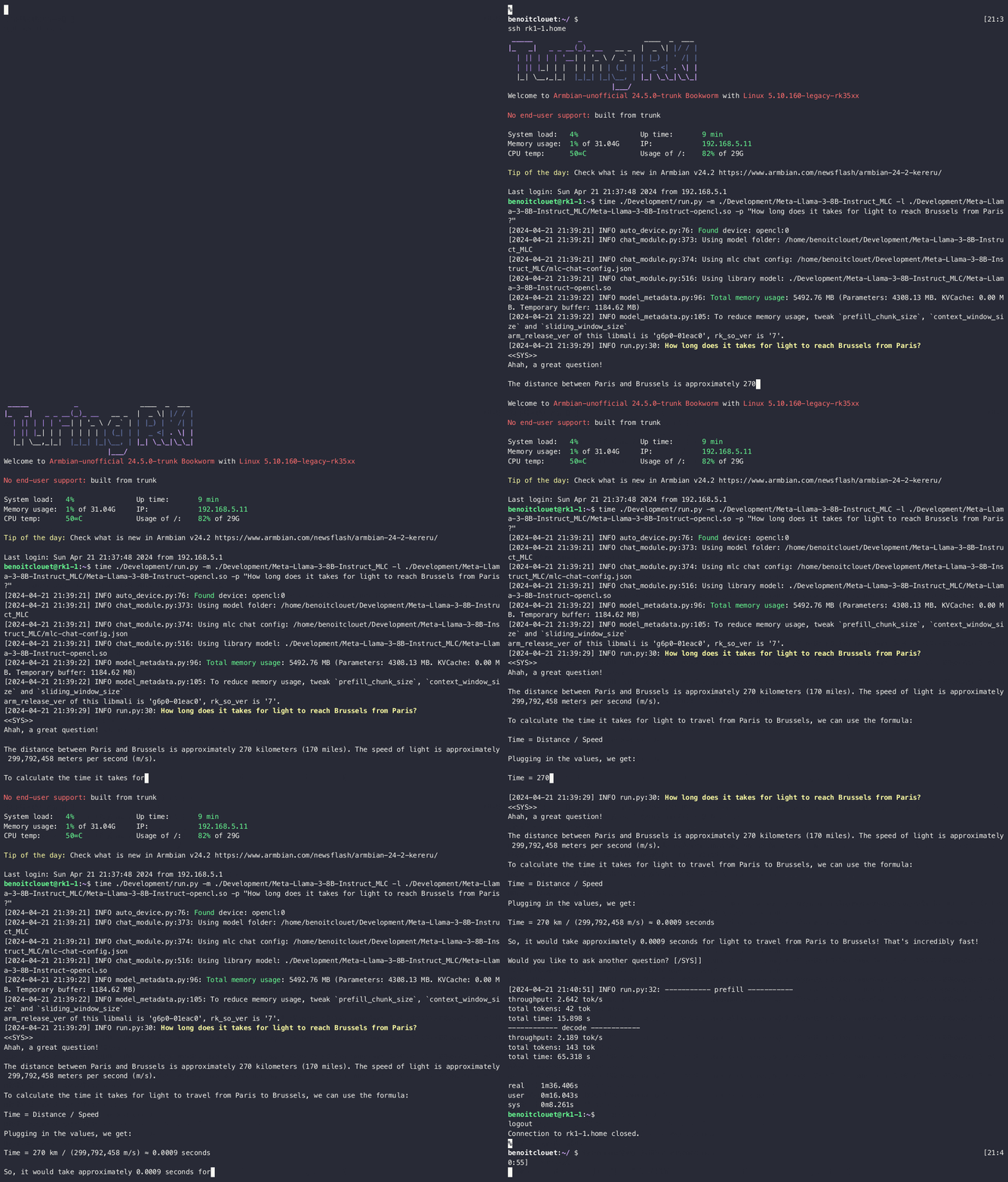
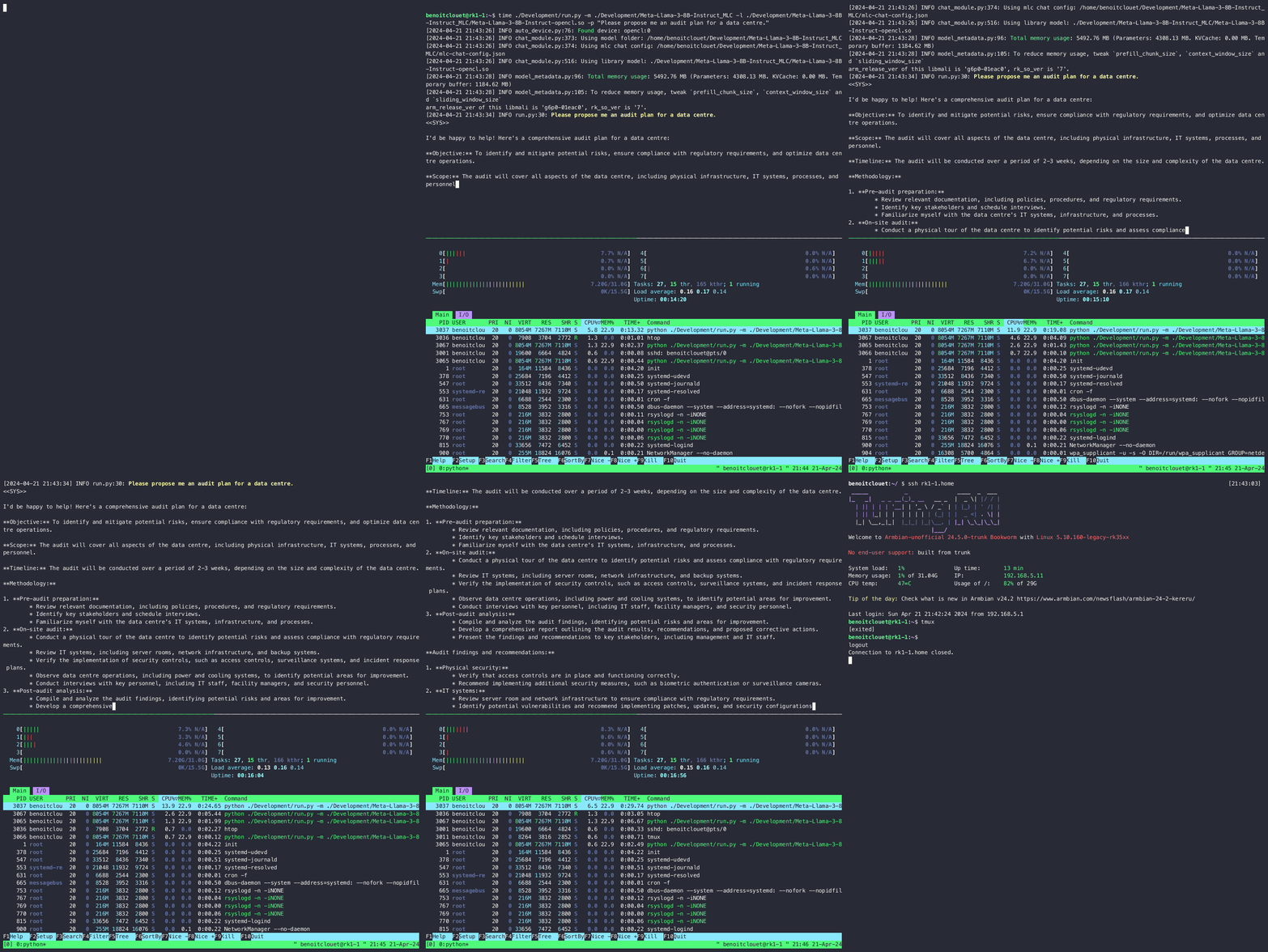
With only 2.7 tokens generated per second it’s not fast, but it is decent for sure. Bear in mind that this 8 billions parameters inference is performed using only the GPU and that CPU consumption remains close to zero throughout the process. Note how nice the reasoning is, but also how it fails at handling properly the units (the correct answer is of course 1.07 millisecond and not 1.07 microsecond).
To give you a grasp of the inference speed, here is a recording of a session with the question above (the playback speed is untouched):
To show you CPU consumption during inference, here is another example with a monitoring of the machine running in parallel:
Possible expansion to this experiment could be:
Taking advantage of the CPU also. After all, the RK1 has 8 nice CPU cores just awaiting to be used. Using them in conjunction with the GPU may help speeding up things a bit. Since memory is shared between the GPU and the CPU, there would be no need to load weights twice. However, I guess some synchronization between GPU and CPU should be performed to avoid race conditions.
RK3588’s is geared with a dedicated processor called NPU which may also be leveraged in the process. Unfortunately, the documentation from Rockchip is scarse (and most of it is in Chinese…). I guess I will have to dig a little bit further.
Now I have to actually understand what an LLM is, because on that matter:

That’s all for now! I’d be happy to get your thoughts on this, please do not hesitate to contact me.